


Uber - Driver: Drive & Deliver
4.6145.01K Reviews
App Specs
- Version
- Varies with Device
- Updated On
- License
- Free
- Downloads
- 100,000,000+
- Developer
- Uber Technologies, Inc.
- Categories
- Business
- Platform
- Android, iOS
Screenshots
 Analysis by AppCompare
Before I get into the day-to-day experience, it’s worth knowing what kind of commitment this app asks for: it can organize work, but it can’t make every shift smooth or every trip worthwhile. I find it most useful when I treat it as a tool for managing the driving or delivery work I have chosen, rather than a promise of easy income.
Who is likely to get the most from it?
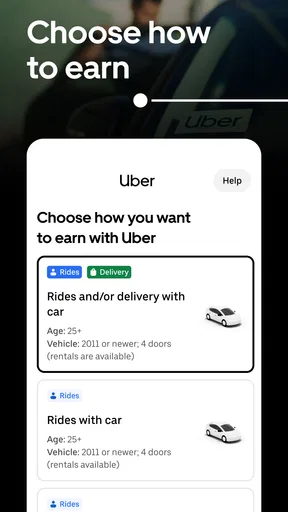
The app is aimed at people who want to earn through driving or deliveries and value some control over when they work. That flexibility may suit someone fitting trips around other responsibilities, or a driver who wants the option to consider both passenger rides and delivery work. It is less compelling if you want a predictable schedule, guaranteed earnings, or a job where someone else handles route decisions and customer interactions.
I’d also think carefully about the kind of driving you actually enjoy. Passenger trips involve direct interaction and the responsibility of carrying people; delivery work shifts the focus to collecting and dropping off orders. Having both kinds of work in one app sounds convenient, but switching between them does not remove the different demands of each. A quiet passenger shift and a busy delivery period can feel like entirely different jobs.
Guides and Analysis on Uber - Driver: Drive & Deliver
Where setup and first use can feel less simple
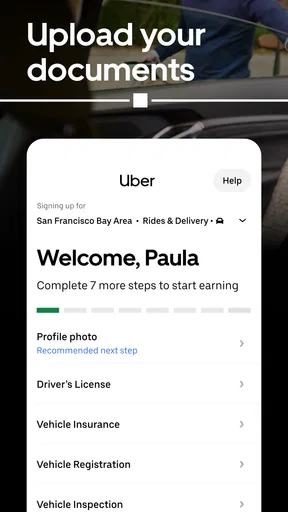
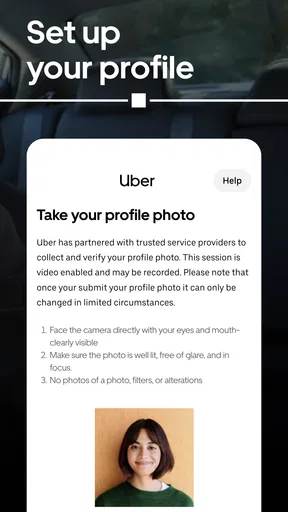
The sign-up screens may be easy to follow, but getting through the full process is not the same as being ready to earn immediately. You have to provide the required information and documents, and approval includes a background check. I would do that preparation before planning a shift around the app, and make sure the details you enter are accurate and consistent. If a step appears pending, reread the instructions in the app rather than repeatedly submitting the same information.
Uber Technologies, Inc. publishes this free business app, which is intended for everyone by its age rating. Its broad audience should not be mistaken for a promise that every person or vehicle can begin working without checks: the onboarding process still matters. If you are installing it on an older phone, check that your device meets the listed minimum operating-system requirement of version 9 before troubleshooting a download or launch problem.
The current release is version 4.557.10001. I would keep the app up to date through the usual app-store process and restart the phone if an update or installation seems stuck. Those are sensible first checks, not a guarantee that every issue is caused by the app; a weak connection, device storage, or an operating-system problem can also interrupt setup.
Small workflow choices that can save frustration
Before going online, I’d check that the phone is charged, the route display is readable, and the vehicle is ready for the kind of work I intend to do. Navigation and a live work session depend on having a usable phone throughout the trip. A charger and a quick check of the planned area can matter more in practice than spending time adjusting every screen before leaving.
Worth Reading Before You Choose

Baby Panda World Brings Quick Play to Modern Phones, but Its Game Library Feels Busy

ESPN’s Live Game View Makes Following Close Games Easier

QuizzLand Review: A Good Fit for Short Trivia Breaks, Not Every Player

Basketball Stars: Multiplayer Is Fast, but Can It Recover When Matches Go Wrong?

WEBTOON Turns Phone Updates Into a Better Reading Routine

Link to Windows Runs on Shared Habits, Not Social Feeds
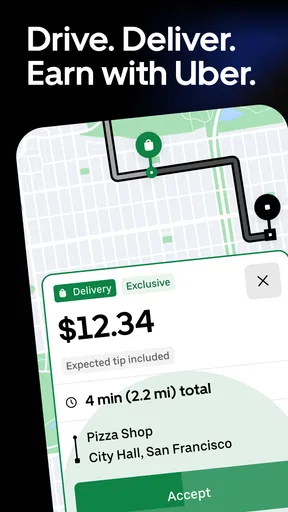
When demand looks busy, I would use the heat map as a clue, not a guarantee. Moving toward a highlighted area may put you closer to potential work, but it does not promise a request or make a long repositioning drive worthwhile. My practical rule would be to compare the likely time and distance to reach that area with the convenience of staying near where I already am. Chasing every apparent hotspot can turn a flexible shift into unnecessary driving.
For deliveries, I’d read the order instructions before setting off from pickup and check them again when approaching the drop-off. That simple pause helps avoid arriving at the right general location without knowing what the customer asked for. If a detail is unclear, the better response is to use the available in-app support or contact options where appropriate, rather than guess and risk a missed handoff.
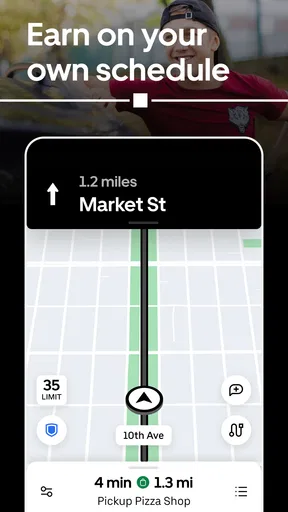
For passenger trips, I’d give myself a moment to review the route and directions before moving. Navigation can help with the journey, but it is still sensible to pay attention to the road and use judgment when traffic or a turn makes the displayed route awkward. The app can guide a trip; it cannot replace safe driving or local awareness.
How to recover when a shift goes off track
If the screen stops responding or a trip view does not update, I’d first get to a safe place before touching the phone. Then I’d check the connection, give the app a moment, and reopen it if needed. If the problem continues, restarting the phone is a straightforward next step. I would avoid repeatedly tapping controls while driving, both because it is distracting and because it can make it harder to tell what has actually happened.
If the issue concerns a document, account status, or a trip-specific problem, general phone troubleshooting may not resolve it. I’d use the support route inside the app and explain what screen or step is causing trouble. Keeping the description focused makes it easier to distinguish an account or trip question from a device problem. For anything urgent on the road, safety comes first; sorting out the screen can wait until the vehicle is stopped.
It is also worth separating app trouble from ordinary work uncertainty. A quiet period does not necessarily mean the app has failed, and a heat map is not a booking schedule. Similarly, a route that takes longer than expected may reflect traffic or a changed road situation rather than a faulty navigation screen. Checking the connection and the app is sensible, but I would not assume every disappointing shift has a technical cause.
How it compares with other ways of finding driving work
Compared with looking for work through a conventional employer, this app puts more of the immediate trip workflow in the driver’s hands. That can feel freeing if you want to choose when to go online, but it also means you need to make your own decisions about when to work and how to handle the practical details of a shift. Someone who prefers a fixed roster and a more predictable routine may be better served by a traditional job.
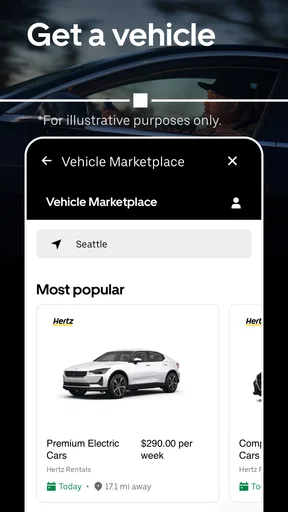
Compared with using separate tools for passenger and delivery work, the option to move between rides and deliveries is a useful convenience. It gives a driver another kind of task to consider without treating the app as a complete solution to every slow period. The trade-off is that each type of work has its own pace and customer expectations, so I would not assume that switching modes automatically improves the value of a shift.
The app has a 4.6 average from around 5.5 million ratings, with more than 141,000 written reviews and over 100 million installs. That level of reach suggests many people have tried it, but popularity alone cannot tell you whether local demand, your schedule, or the work itself will suit you. I would judge it by how well its workflow fits your circumstances, not by its broad audience.
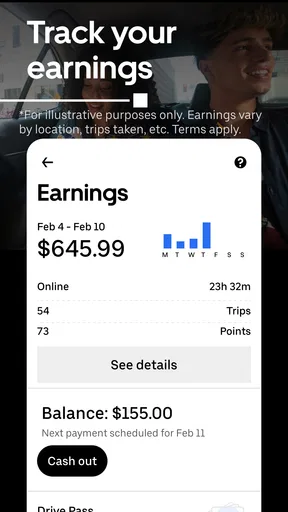
A realistic use case might be someone with a free evening who checks the app, chooses the kind of work they are comfortable doing, and stays within a familiar area rather than driving far to chase a possible busy patch. They can use the navigation for each trip, keep an eye on earnings as the shift progresses, and stop when the time they set aside is over. The useful part is the ability to organize that session in one place; the uncertain part is that actual requests and the pace of work can vary.
If you are deciding whether to try it, ask yourself a few practical questions. Are you comfortable spending time on the road and handling customer-facing situations? Can you complete the document and approval steps before counting on the work? Do you have a phone and vehicle setup that can support a shift? And are you willing to treat earnings information and demand displays as planning aids rather than guarantees? Your answers matter more than the app’s broad popularity.
Uber Driver is not the right fit for someone who needs immediate, dependable income or dislikes navigating changing routes and interacting with customers. It may also be a poor choice if using a phone while working would be stressful or unsafe in your circumstances. In those cases, a fixed-hours role or another form of work with a steadier routine may be a better match.
For me, the strongest reason to consider it is practical flexibility: rides and deliveries can be handled through the same work app, and the interface brings navigation and earnings tracking into the shift. The main caution is to keep expectations realistic. The app helps manage work; it does not remove the uncertainty, preparation, or responsibility that come with driving.
Have you ever thought about making some extra cash while cruising around town? That's where the Uber - Driver: Drive & Deliver app comes into play. I decided to give it a whirl and let me tell you, it's quite the ride!
Getting Started with Uber - Driver
First things first, signing up was a breeze. I downloaded the app, filled in the necessary details, and in no time, I was ready to hit the road. The Uber - Driver app walks you through the setup with easy-to-follow instructions. Even if you're not tech-savvy, you’ll find it straightforward. The app checks your documents, and you need to pass a background check, but it’s all pretty standard stuff.
Once you're approved, you’re all set to start driving. The app has a clean, intuitive interface, making it easy to navigate. You can toggle between accepting rides or deliveries, which adds a nice bit of flexibility depending on your mood or schedule.
Driving Experience
Hitting the road with Uber - Driver is where the real fun begins. The app provides clear navigation and updates you on traffic conditions. It was reassuring to know I wasn’t alone on the journey; the app's built-in support is just a tap away, ready to assist if you run into any hiccups.
One feature I found particularly useful is the heat map, which shows areas with high demand. It’s like having a treasure map for fares, guiding you to where the action is. Plus, you get to keep track of your earnings in real-time, which is pretty motivating if you ask me!
Deliveries: A Different Kind of Ride
If driving people around isn’t your thing, you can switch to deliveries. The process is similar, but instead of passengers, you're picking up parcels or food. I found it to be a nice change of pace, especially during meal times when the orders just keep rolling in.
One thing to keep in mind is that tips can be a significant part of your income, so delivering with a smile goes a long way. Customers appreciate prompt service, and the app makes it easy to follow delivery instructions to the tee.
Final Thoughts
All in all, the app is a solid choice for anyone looking to make some extra cash on the side. It’s flexible, user-friendly, and offers a sense of independence that traditional jobs might lack. Whether you’re driving passengers or delivering packages, the experience is rewarding and often entertaining.
So, if you’re considering hopping on this digital bandwagon, I’d say go for it! Just remember to keep your phone charged, your car in good shape, and your playlist ready for the miles ahead. Happy driving!
Pros
- User-friendly interface for easy navigation.
- Flexible working hours to suit your schedule.
- Real-time earnings tracking for transparency.
- In-app GPS for efficient route planning.
- Instant notifications for new ride requests.
Cons
- High commission rates can reduce earnings.
- Frequent app updates may cause bugs.
- Requires constant internet connection.
- Limited support during peak hours.
- Battery drain due to GPS usage.
FAQs for Uber - Driver: Drive & Deliver
What are the basic requirements to become an Uber driver?
To become an Uber driver, you must meet a few basic requirements. You need to be at least 21 years old, have a valid driver’s license, and own an eligible vehicle. Additionally, you’ll need to pass a background check and have at least one year of licensed driving experience (or three years if you're under 23).
How does the payment system work for Uber drivers?
Uber drivers are paid based on the number of rides and distance traveled. Fares are calculated using a base fare, time, and distance. Payments are made weekly via direct deposit. Drivers can also earn more through surge pricing during high-demand times and by achieving specific goals set by Uber, like completing a certain number of rides.
What is the rating system and how does it affect drivers?
Uber uses a two-way rating system where both drivers and riders rate each other after a trip. Drivers need to maintain a certain rating to continue using the platform. Low ratings can lead to deactivation, so maintaining high service quality is crucial. Uber provides feedback to help improve ratings if needed.
Are there any costs associated with driving for Uber?
Yes, there are costs associated with being an Uber driver. You'll need to cover fuel, vehicle maintenance, and insurance expenses. Uber also takes a commission from each fare. Additionally, you may need to invest in a smartphone with a data plan, as the Uber Driver app is necessary for accepting rides and navigation.
How flexible is the schedule for Uber drivers?
Uber offers a highly flexible schedule for drivers. You can choose when to work and for how long, making it a suitable option for those looking for part-time or supplementary income. The app allows you to log in and out at your convenience, providing the freedom to balance other commitments easily.


